
⚠️ IMPORTANT: AppFolio Auto-Approves Pending Batches
On the 28th and the 1st of every month, AppFolio automatically approves ALL pending batches.
This means:
- Any batch still waiting for review on those dates gets approved and posted to resident ledgers as-is.
- You will not get a chance to review or reject it first.
- If a batch has errors, they’ll post to resident ledgers and will need to be fixed after the fact.
Best Practice
- Approve your batch before end of day on the 14th so charges make it onto the resident statements that go out on the 15th. Any batch still pending on the 28th or the 1st will be auto-approved by AppFolio.
Step 1: Open the Utility Charge Review in AppFolio
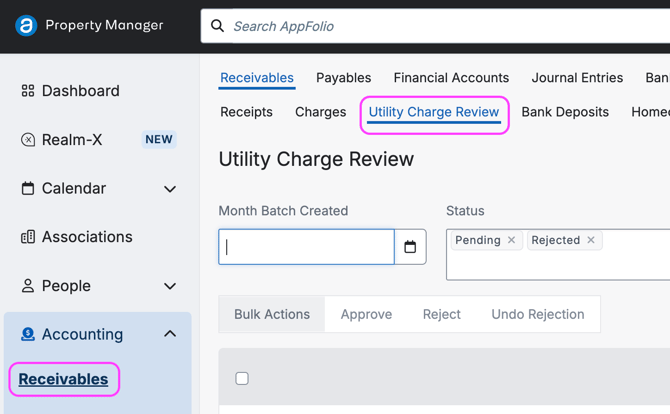
- Log in to AppFolio.
- Click Accounting in the left sidebar.
- Click Receivables.
- Click the Utility Charge Review tab.
- Find the batch from Livable for your property.
Step 2: Review the Charges
Click the Blue Linked Property Name to Open the Batch of Charges
Before approving, check that:
- The property and service dates are correct.
- Each resident’s charge amount looks right.
- No residents are missing who should be billed.
If something looks wrong, don’t approve the batch yet. Fix it in Livable Pro first, or contact our team.
Step 4: Approve the Batch
- Click Approve.
- If the batch has errors, click Reject instead and reach out to our team.
- Remember Pending Batches will be auto-approved on the 28th or the 1st.
What Happens Next
- Approved charges post to each resident’s ledger in AppFolio.
- Livable emails resident statements on the 15th (Sends paper statements to residents enrolled in paper)
Good to Know
- The Charge On Date setting controls which date the charges are due by Residents in AppFolio
- Final Statement Estimate (FSE) batches for move-outs are separate, one per resident, and can be set to auto-approve by visiting your Stack Marketplace settings and check marking the box to enable auto-approved Final batches.
Need Help?
Email help@livable.com, chat with us in Livable Pro Monday through Friday, or submit the Support Form.