
Business Impact
⚠️ This update applies to move-outs scheduled AFTER 1/28/2026. Move-outs scheduled before 1/28/2026, will need to follow the prior workflow. If additional assistance is needed in performing a move-out prior to 1/28/2026, please contact your Account Manager.
- Faster move‑out processing: Automating FSEs and auto‑approving final batches reduces manual work and speeds up closing resident accounts.
- Better collections: Correct charge‑on dates and caps ensure charges appear on the ledger in time for residents to see and pay them.
- Lower support friction: Clear handling of statement caps reduces resident disputes and back‑and‑forth with your team.
Flexibility by account: Customers can choose more automation (auto‑approve on) or more control (auto‑approve off) depending on how complex their caps are.
⚙️ Setting Up Livable FSE with AppFolio
Decide on auto‑approve for final batches
In the AppFolio–Livable integration, choose whether to auto‑approve final batches created from Livable. Visit the AppFolio Stack Marketplace to modify your Livable integration settings.Recommended:
Turn auto‑approve ON if you are current on billing and don’t frequently adjust statement caps/admin fees.
Consider auto‑approve OFF if you have many statement caps, are catching up on older billing, or want to review each final batch manually.
Step‑by‑step: Using Livable FSE with AppFolio
1. Prepare billing data
If you are up to date on processing your Bills on the Livable Allocation tables you can skip this step!
- Enter recent utility bills in Livable and approve allocation tables so charges appear in your AppFolio pending batch.
- Confirm residents have billing start dates that cover the billed periods so charges generate correctly.
2. Process a move‑out / final statement
- In AppFolio, process a final statement / move‑out for the resident as usual.
- Livable will take any pending utility charges for that resident and create a resident‑specific final batch (one batch per resident).
- You can review the batch details under the “AppFolio Batch” in Livable.
- You can approve or reject a single finalthat batch without affecting other residents’ final batches/statements.
3. Review the final statement details
- Navigate to the FSE View: Residents > Resident's Name > FSE Icon
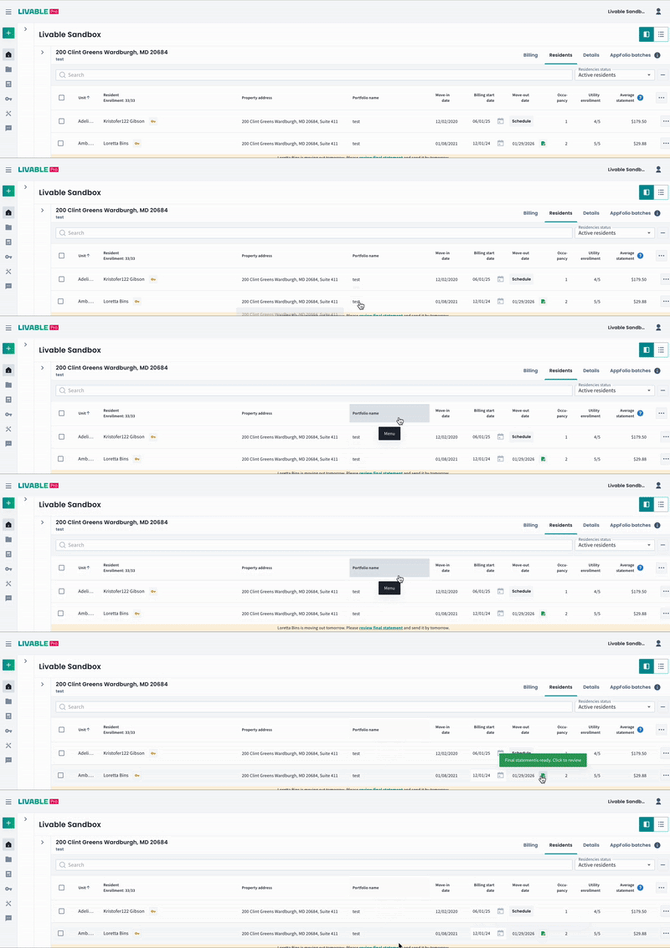
- In the FSE view, you’ll see:
- Utility charges from existing allocation tables.
-
- An estimate for any unbilled days up to the move‑out date.
-
- An optional goodwill deduction (default 5%, editable).
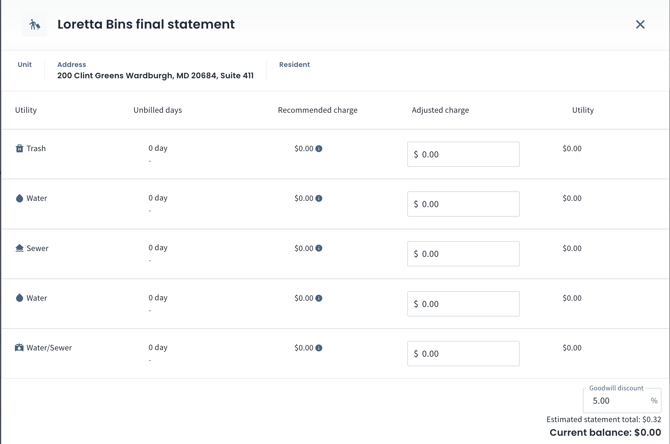
💡 Please note currently there is no submit button; the final batch is created automatically, and you confirm by reviewing the AppFolio batch itself.
4. Adjust statement caps when needed
- Statement caps are applied as one total value, not per‑month
- IF the final estimate covers several unbilled periods, increase the cap to cover all of them (for example, roughly 3× a one‑month cap for three periods).
- IF the final estimate covers several unbilled periods, increase the cap to cover all of them (for example, roughly 3× a one‑month cap for three periods).
- After you update the resident’s statement cap, wait for AppFolio to show the batch as up to date, then review the updated final batch and approve.
- If final batches are set to auto‑approve, and a cap was too low, you may need to issue a credit or edit/delete the line item after posting.
5. Use the right charge‑on date
- For final statements, set the charge‑on date to match the move‑out date so charges appear on the resident ledger when the account is closing.
- Avoid charge‑on dates far in the future, which can prevent residents from seeing or paying their final charges in time.
6. Handle move‑out date changes
- If you change a resident’s move‑out date and a final batch already exists:
- Reject that specific final batch in AppFolio (it only affects that resident).
-
- Livable will generate a new final batch using the updated date and usage, typically two days before the new move‑out date.
- Livable will generate a new final batch using the updated date and usage, typically two days before the new move‑out date.
- If you see a small “informational” line (for example, related to a rejected batch), you can ignore it or credit a penny if needed; focus on the most recent final batch tied to the correct date.
7. Understand skipped billing months
- If you deliberately skip a billing month (for example, bill October and January but not December), Livable does not auto‑estimate the skipped month.
- The system estimates from the last billed date forward only; any intentionally skipped period will stay unbilled.